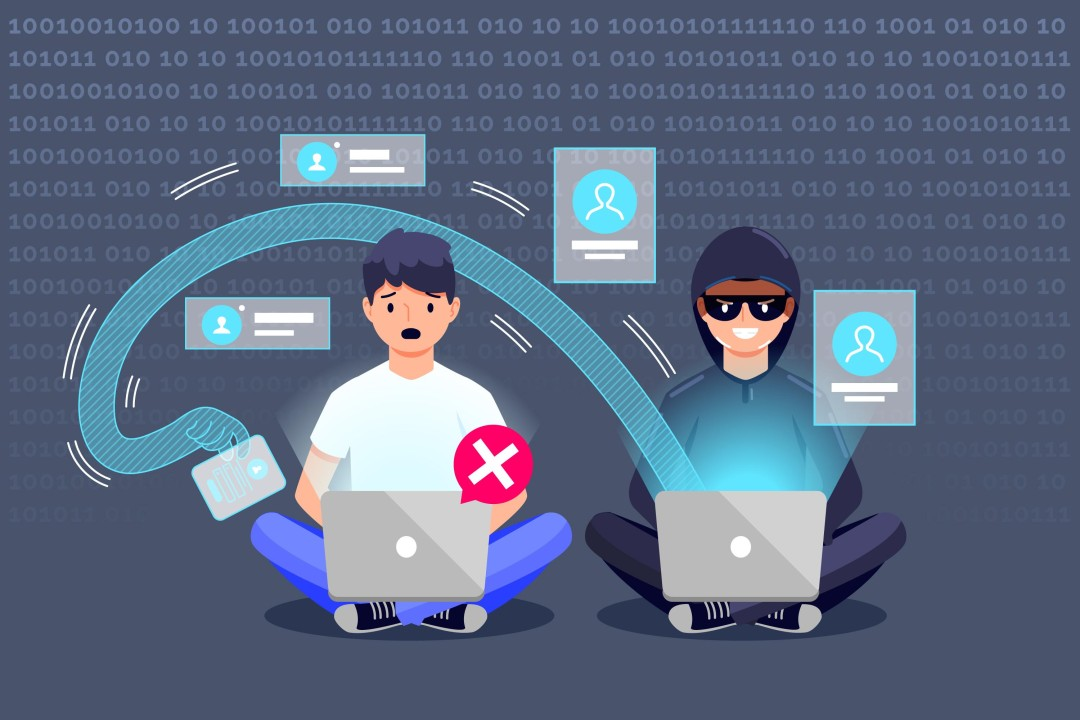
Phishing attacks are among the most common cybersecurity threats facing internet users today. They are designed to trick people into revealing sensitive information such as passwords, banking details, authentication codes, or personal data.
Unlike some cyberattacks that depend on highly sophisticated technical vulnerabilities, phishing often relies on something much simpler: human trust. An attacker may pretend to be a bank, employer, delivery company, social media platform, colleague, or even a friend.
The good news is that understanding how phishing works can make these attacks much easier to recognize. By learning the warning signs and following a few practical security habits, individuals and businesses can significantly reduce their exposure to phishing.
In this guide, we will explain what phishing attacks are, how they work, the most common types of phishing, warning signs to look for, and how to protect yourself from becoming a victim.
What Is a Phishing Attack?
A phishing attack is a form of social engineering in which an attacker attempts to deceive a person into taking an unsafe action.
The attacker may send an email, text message, social media message, phone call, or other communication that appears legitimate.
The goal may be to convince the victim to:
- Click a malicious link
- Enter a password
- Share financial information
- Download a harmful file
- Provide an authentication code
- Transfer money
- Give access to an account
- Reveal confidential business information
The message often creates a sense of urgency. For example, an attacker may claim that your account will be closed unless you verify your identity immediately.
The pressure is intentional. When people feel rushed, they are more likely to act without checking whether a request is genuine.
How Do Phishing Attacks Work?
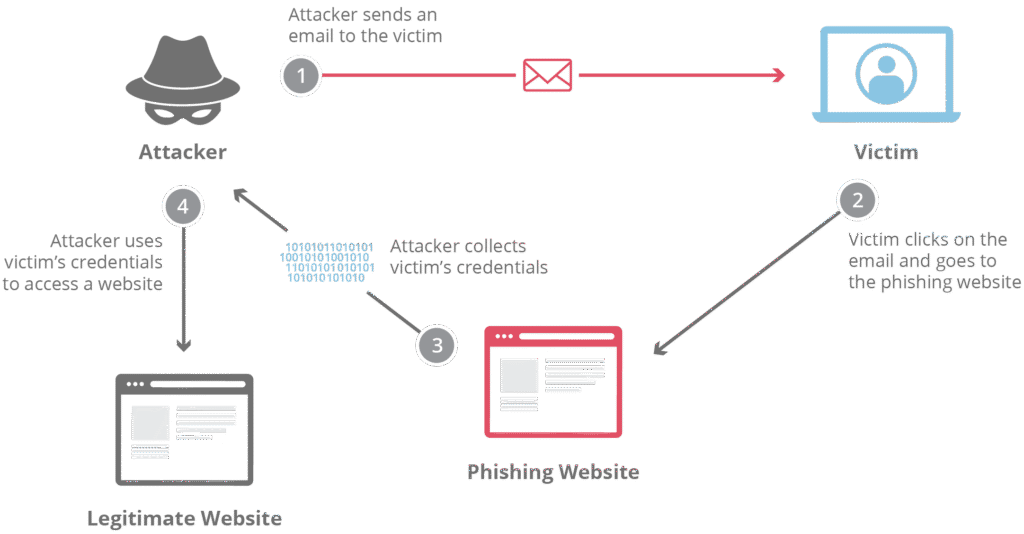
Most phishing attacks follow a relatively simple pattern.
Step 1: The Attacker Creates a Fake Identity
The attacker impersonates a trusted organization or person.
They may copy logos, colors, writing styles, and other visual elements to make the communication look authentic.
Step 2: The Victim Receives a Message
The message may arrive through email, SMS, social media, messaging applications, or another communication channel.
It may contain a link, attachment, phone number, or request for information.
Step 3: The Message Creates Urgency
The attacker may claim there is a problem with the victim’s account, payment, delivery, security, or subscription.
This encourages the victim to respond quickly.
Step 4: The Victim Takes the Requested Action
The victim might click a link and enter login credentials on a fake website, download an attachment, or send information directly to the attacker.
Step 5: The Attacker Uses the Information
The stolen information may be used to access accounts, steal money, commit identity fraud, or launch additional attacks.
In business environments, compromised credentials can potentially provide access to company systems and sensitive data.
Common Types of Phishing Attacks
Phishing is not limited to traditional emails. Attackers use multiple communication channels.
1. Email Phishing
Email phishing is one of the most familiar forms.
An attacker sends a message pretending to be a legitimate organization. The email may contain a fake login page or malicious attachment.
Common themes include:
- Password expiration
- Account suspension
- Unusual login activity
- Payment problems
- Fake invoices
- Security alerts
- Delivery notifications
2. Spear Phishing
Spear phishing is more targeted.
Instead of sending the same message to thousands of people, an attacker researches a specific person or organization and creates a personalized message.
For example, an attacker may impersonate a manager and ask an employee to urgently purchase gift cards or transfer money.
Because the message appears personalized, it can be harder to recognize.
3. Smishing
Smishing is phishing conducted through SMS or text messages.
A message may claim to be from a bank, delivery company, government organization, or online service.
It may include a link asking you to confirm information or resolve an account problem.
Never assume a text message is safe simply because it appears on your phone rather than in your email inbox.
4. Vishing
Vishing, or voice phishing, uses phone calls or voice messages.
An attacker may pretend to be a bank representative, technical support agent, government employee, or company executive.
They may attempt to pressure the victim into providing passwords, authentication codes, financial information, or remote access.
5. Business Email Compromise
Business email compromise involves criminals impersonating executives, employees, vendors, or business partners.
A common example is a fraudulent payment request that appears to come from a senior employee.
Organizations should establish procedures for verifying unusual financial requests, especially when they involve changing bank details or making large transfers.
6. Social Media Phishing
Attackers can also use social media platforms to create fake accounts, send malicious links, or impersonate real people.
A message may claim that you have won a prize, received a job opportunity, or need to verify your account.
Always be cautious when strangers or unfamiliar accounts ask you to click links or provide personal information.
Warning Signs of a Phishing Attack
Knowing the warning signs is one of the most effective ways to prevent phishing.
Unexpected Requests for Information
Be cautious when a message unexpectedly asks for passwords, payment information, authentication codes, or personal details.
Legitimate organizations generally have established processes for handling sensitive information and may not request passwords or security codes through ordinary messages.
Urgent or Threatening Language
Phishing messages often try to create panic.
Examples include claims that:
- Your account will be closed today
- Your payment has failed
- Your password has expired
- You will lose access
- Legal action will be taken
- Your account has been hacked
The purpose is to make you act before you have time to think.
Suspicious Links
Do not automatically trust a link because the visible text looks legitimate.
On a computer, you can often hover over a link to inspect its destination before clicking.
On mobile devices, be particularly cautious with shortened links or unfamiliar domains.
Unexpected Attachments
Be careful with attachments you were not expecting, particularly executable files, compressed files, or documents requesting you to enable unusual features.
If a colleague sends an unexpected attachment, verify it through another trusted communication method.
Spelling and Grammar Problems
Poor spelling and awkward grammar can be warning signs, although professional-looking phishing messages are increasingly common.
Do not rely on grammar alone to determine whether a message is legitimate.
Strange Sender Addresses
An email may display a familiar name while using a completely different address.
Always inspect the actual sender address when something seems suspicious.
Requests for Authentication Codes
Never share one-time passwords or authentication codes simply because someone claims to be from technical support, your bank, or another trusted organization.
These codes can sometimes be used by attackers to bypass security protections.
How to Avoid Phishing Attacks
Think Before You Click
Do not click links simply because a message creates urgency.
Pause and ask yourself:
Was I expecting this message?
Does the request make sense?
Do I know the sender?
Is the link or website address legitimate?
Taking a few seconds to verify a request can prevent serious problems.
Visit Websites Directly
If you receive a message claiming that you need to log into an account, avoid clicking the included link when possible.
Instead, open your browser or official application and navigate to the service directly.
This reduces the risk of being redirected to a fake login page.
Use Multi-Factor Authentication
Multi-factor authentication adds an additional layer of protection to your accounts.
Even if an attacker obtains your password through phishing, MFA can make unauthorized access more difficult.
For particularly sensitive accounts, consider stronger authentication options such as security keys where supported.
Use a Password Manager
Password managers can help users create unique passwords for different accounts.
Unique passwords are important because they prevent attackers from using one compromised password to access multiple services.
Keep Devices Updated
Install security updates for your operating system, browser, applications, and security software.
Updates frequently address known vulnerabilities that attackers may attempt to exploit.
Verify Unusual Requests
If someone asks you to transfer money, change payment information, provide sensitive documents, or reveal confidential information, verify the request through another trusted channel.
For example, if you receive an urgent financial request from someone claiming to be your manager, call them using a known phone number rather than replying to the original message.
What to Do If You Clicked a Phishing Link
Do not panic.
The appropriate response depends on what happened after you clicked.
If you only opened a suspicious page and did not enter information or download anything, close the page and avoid interacting with it further.
If you entered a password, change that password immediately using the legitimate website or application. If the password was reused elsewhere, change it on those accounts as well.
If you provided financial information, contact your financial institution through an official communication channel.
If the affected account belongs to your employer, report the incident to your company’s IT or security team as soon as possible.
If you downloaded a suspicious file, avoid opening it and follow your organization’s security procedures. If you already opened it, disconnecting the affected device from networks may be appropriate while you seek professional assistance.
How Businesses Can Prevent Phishing
Businesses need a layered approach to phishing prevention.
Employee Security Training
Employees should regularly learn how to recognize suspicious messages and report them.
Training should include realistic examples rather than only theoretical explanations.
Email Security Controls
Organizations can deploy email security technologies that help identify malicious messages, suspicious attachments, and dangerous links.
However, technical controls should complement rather than replace employee awareness.
Multi-Factor Authentication
MFA should be enabled for important business accounts, especially email, administrative, financial, and cloud services.
Least-Privilege Access
Employees should receive only the access necessary for their jobs.
This can limit the damage caused if an account becomes compromised.
Verification Procedures
Companies should establish clear procedures for sensitive requests involving payments, passwords, account changes, or confidential data.
Employees should know when independent verification is required.
Why Phishing Is Still So Effective
Phishing continues to work because attackers exploit human psychology.
They may use:
- Fear
- Urgency
- Curiosity
- Authority
- Trust
- Financial incentives
- Social pressure
A sophisticated phishing message does not necessarily need to fool a technical security system. It only needs to convince one person to take the wrong action.
That is why cybersecurity awareness is such an important part of modern security.
Final Thoughts
Phishing attacks are designed to manipulate people, not simply computers. That is why awareness is one of the strongest defenses.
Be suspicious of unexpected requests, especially those involving passwords, payments, authentication codes, or confidential information. Avoid clicking questionable links, verify unusual requests independently, use strong unique passwords, and enable multi-factor authentication.
Businesses should go further by combining employee training with email security, access controls, monitoring, and clear incident-reporting procedures.
The most important habit is simple: slow down before you act. When a message creates pressure and demands an immediate response, take a moment to verify it. That small pause can make the difference between protecting your information and giving an attacker exactly what they wanted.